Showing posts with label Android. Show all posts

Saturday, December 10, 2016

MyEcom - Buy Sell and Interact : A Review on Android App

MyEcom is the best marketplace app, which helps you buy and sell any stuff from all over the world. MyEcom is completely free, safe and easy, with MyEcom it's easier to find all classifieds from all around the world. Now with MyEcom it is easier to get the job done with all the comfort right from your phone.

MyEcom - Buy Sell and Interact

It is free to list all the items and it is easier to discover new products at one place within MyEcom.
Some of it's features include:
Easy
• Snap a photo and list in seconds
• Use GPS and zip code to find thousands of listings
• Make an offer by sending a text
• Update your post and send it to the top of the list
Safe
• Email, Google and Facebook verification's
• Messaging system hides your contact info
• Rate and read reviews of buyers and sellers
• MyEcom team constantly reviews new listings
Fun
• Discover great stuff by browsing product photos
• Search and filter to find relevant listing
• Make offers and negotiate deals
• Chat to share photos and meeting spots
Shop, make offers, and list items and services for free. It's like your own online garage sale without the hassle.
MyEcom - Buy Sell and Interact

Still waiting ? Download it now and discover awesome listings from the MyEcom app. Are you ready to go for shopping?
Find out more about us on: http://www.virtusoconnect.com/myecom
Link to Google Play Store: MyEcom - Buy Sell and Interact
Read More...

Thursday, September 11, 2014

SimCity BuildIt Have been Introduced for Android

Electronic Arts is getting a brand new SimCity game to Android by means of SimCity BuildIt. This is not the very first SimCity game on Android, SimCity Luxurious was formerly available but continues to be taken lower in the Google Play store.

SimCity BuildIt Have been Introduced for Android


Recommended like a "SimCity game like you haven't seen before, created for players on the runInch the game's official page states it'll have " three dimensional-quality graphics." Game play smart there's very little known how this edition is going to be like other SimCity games. I'm not sure when the statement that it's like something we've never witnessed before is really a promise or perhaps a threat.

The newest SimCity on PC created a bad style of many players' mouths, just how farmville is going to be similar or different should alllow for a fascinating release to follow along with. Most probably a totally free to experience title, it will likewise need to follow another previous EA debacle triggered by Dungeon Keeper.

Referrences : EA, Android Police
Read More...

Google Hangouts 2.3 Update Delivers Outstanding Google Voice Integration Plus A Huge Visual Overhaul [APK Download]

We saw Google Voice integration go reside final night, however it contained numerous problem which this update is anticipated to fix. However as exciting as this is, what's more instantly striking will be the new visual redesign.

Google Hangouts 2.3 Update Delivers Outstanding Google Voice Integration Plus A Huge Visual Overhaul [APK Download]

What is New
Using the quantity of smudging this publish needed, I really feel like I have been working on classified paperwork. The new version of Hangouts plasters your email address completely all over the place. It is not an issue when using the application, however it does make for a few instead swirly screenshots.

Correct from the gate, the brand new UI is significantly greener. As Google prepares Hangouts for your subsequent version of Android, it's produced the application much more colorful, and also the toolbar now features a vibrancy that it previously did not. Functionality-wise, the more urgent alter right here is the addition of tabs. By default, there are two: a contacts tab and one listing your prior chats. Swiping now switches in between tabs, therefore the old swipe-to-archive performance has kicked the bucket.

If you set up the brand new Hangouts Dialer, the amount of tabs jumps to three. Regardless of its personal Play Shop presence, the Dialer isn't its own devoted app. It simply hyperlinks to Hangout's voice tab. Benefit from the additional icon inside your application drawer.

Google Voice integration makes its presence known within the app's options. In the event you meander more than, you'll come across the option to ring Hangouts for incoming calls to your Google Voice quantity.

According to the supplied Google assistance web page for integrating Voice with Hangouts, when new voicemail messages arrive, a new unread notification will appear at the leading from the Hangouts list using the voicemail icon within the message. You are able to then click the perform icon to hear the concept.
We have waited a long time for this, so if you have not currently carried out so, feel free to scroll down and show any of the three mirrors below how terribly you've desired to accessibility Google Voice from Hangouts.


The APK is signed by Google and updates your current app. The cryptographic signature ensures the file is safe to install and was not tampered with in any way. Instead of wait for Google to push this obtain for your gadgets, which can take times, obtain and set up it just like every other APK.

File name : com.google.android.talk.2.3 (22031189).apk
Version : 2.3
File size: 14.14 MB
MD5 : 421415cb3ff7cb3f349cd57ba717097a
  1. ZippyShare mirror
  2. MediaFire mirror
  3. MEGA mirror

Read More...

Thursday, January 24, 2013

Protecting your Android login information


Protecting your Android login information

It's always a good idea to protect your login information on an Android device and the best way to do that is by using 2 factor authentication. Two factor authentication is also known as dual factor authentication, and it will use any 2 of 3 pieces of information to establish your identity.

One of the identity authentication methods will consist of either a password or personal identification number (PIN) or the answer to a security question. It is based on something you know.

The second authentication method will be based on something you possess. It may be a smart card or ID badge, a USB key, or a one-time password device which may be used to set a browser or application cookie.

The third possibility is usually something unique to your person such as a fingerprint or other biometric data. Sometimes this will also be done through phone verification. Voice or phone verification may fall under the heading biometric data or it may be something you possess, based on caller ID or a PIN sent by SMS text message.

There is identity verification software available that will make two factor authentication easier to implement. These will usually include managing the creation of a one time use password which gets sent to the user by e-mail or text message. There is usually a cutoff time during which the password is valid such as 30 or 60 minutes.

These software tools can be important not only for protecting your smart phone login, but they're also important for many things we do online such as shopping and online banking. They also make it easier to stay in compliance with various regulations related to security and privacy since they make it their job to stay on top of the various changes as they happen, whether it be in the U.S. or anywhere around the globe.

Read More...

Sunday, January 20, 2013

Android Apps for High-Tech Home Improvement


Home improvement is now made faster and easier with the help of specially designed Android apps which mainly help with the organization process. There are various apps available in the Android Market that will help you tackle any home redesign or renovation project, whether you're simply rearranging furniture or painting a room. Here's a list of the best and newest home improvement apps for your Android device.

ColorSmart by BEHR Mobile

With the use of ColorSmart, you can find, preview or coordinate any BEHR paint color for your paint projects. The app allows you to browse colors from any of the BEHR color collections. It also lets you take a picture and tap on it to get a similar BEHR color. There are many other convenient features such as discovering new color combinations from an array of designer-coordinated palettes, previewing your choice of colors in a room image and painting a room easily by using your fingers. You can save room images, colors and calculations and store to your smartphone. This app is available for free at the Play Store.

iHandy Level Free

iHandy Level is completely functional with calibration capability. The app works accurately after you calibrate it. It's a great utility app to use if you're preparing for a wall hanging project. Considering that wall hanging requires much patience and precision, iHandy Level helps provide a precise measure for alignment. The level can be used in face-up, portrait or landscape mode. It's part of the five tools in the iHandy Carpenter toolkit. iHandy Level is available for free, whereas the five tools are paid ones.

Handy Construction Calculators

This is a useful productivity app for construction or renovation projects. It comes with 69 precise and easy-to-use calculators along with precision inputs including feet-inch-fraction and meters-millimeters. Whether you're a builder, do-it-yourself homeowner or contractor, this app can help quicken the calculation process. It also features drawings and layouts to help users understand the output better. The price is $7.99 in the Android Market.

My Measures & Dimensions

Instead of dealing with the hassles of writing on paper, My Measures allows you to take a photo of an object and add dimensions directly. It's a fantastic app for storing and sharing dimensions of various objects. You can add text, arrows and angles to the photo, and store the measurements so you can check them later or share through email. The app supports landscape and portrait orientation. You can purchase the app for $4 at the Play Store.

Work Calendar

If you're busy juggling different activities, and you're bugged with having to set up every calendar entry to match your work schedule, Work Calendar is a useful app to try out. It helps you manage your work schedule in an easy and convenient method. You can set up categories that can be used as templates, combine categories for a more complex schedule and keep an overview of events. The app can be downloaded for $3.

Improving your home has never been more convenient with the slew of Android apps available today. You can enhance and beautify your home easily with the help of these apps. And since your house is one of your most valuable properties, getting it adequately insured is indispensable. Be sure to check that the changes you make are covered by your insurance policy, or get a quote from an online insurance company. Start a home improvement project today, and make your home lovelier with these tips.
Read More...

Saturday, January 12, 2013

Eco-Friendly Data Centers Do Their Part to Green Up the Planet


Eco-Friendly Go Green

More people than ever before believe climate change is real. The growing support for concrete steps to fight it forces governments and companies to seriously consider ways to cut carbon emissions and use cleaner sources of energy. This process is not easy, but more companies see the savings outweigh the costs when going eco-friendly. Data centers are now at the forefront of that effort.

Data Centers Use Dirty Fuel?

As an average person, you may wonder why data centers are carbon emission offenders. Since they rely on electricity on the grid, it would be a common assumption that the energy comes from various sources. However, the truth is quite different. According to the EIA 42% of all electric power produced in the United States comes from coal. Another 25% comes from natural gas. Looking at these numbers, roughly two-thirds of all electricity produced in America comes from fossil fuels. Data centers use a large amount of power everyday and the energy they consume grows with the demand for more cloud computing services like streaming video and other forms of data storage. It was something no one really expected. IT companies know of the growing problem and already actively seek solutions to shrink their carbon footprints

Taking Steps To Solve The Problem

For most companies, the long-term solution of increasing the share of renewable power they use to power their data centers is not practical in the short-term. Due to costs and political barriers, it could take another full decade, if not more, for renewable energy to reach shares at the level of coal electricity. The best and most effective step companies can take now is to find ways to reduce energy use and make changes in the infrastructure of their data centers. Many of these steps are easy and cheap to do. Here are some ways data centers now cut down on electricity use.

Cooling and Lighting

A big source of the energy drain for data centers is cooling and lighting. Since people make use of cloud computing around the clock, the servers can't turn off like other electronics. This means data center servers face the constant threat of overheating. To face this problem most companies spend millions for cooling systems that exacerbate the energy problem. Put simply, it takes even more power to cool servers constantly year round. Lighting makes the problem worse by emitting heat and using even more electricity. New solutions for this include LED lighting and designing data centers to use natural cooling sources like outside air and open aisles. Companies also employ new technologies like motion sensors so data center cooling system only work when needed.

Backup Power

Another threat to cloud computing is backup power. When a major storm hits an area like New York, the damage for the IT infrastructure is astounding because power gets shut down and data lost. To prevent this, many data centers have redundant back up systems. These take extra power. Some companies are looking at implementing renewable energy sources to power and charge back up systems.

Energy Efficient Servers

Another way to cut energy use is the servers. A simple step is for companies to buy EPA certified servers. These servers are certified for their increased energy efficiency. Each of these steps alone might seem small, but together they provide significant step forward towards making data centers more energy-efficient and pushing for larger changes in other aspects of business to fight climate change.

Jessie Brannen has been involved in data center management from the early days of its development. She regularly writes articles that appear on tech blogs. Find out more about data center design and management solutions from ProfitBricks.
Read More...

Android Apps Offer Help to Vision Impaired


Android Apps the Vision

People who are visually impaired are usually left behind in the world of technology. Developers seem to forget that there is a certain percentage of the population that are visually impaired yet computer and technologically savvy. Thankfully for this special group of people, apps developers are coming through for them and now there are a number of apps available for the visually impaired. Now they can function just like the sighted populace talking, texting and participating in online forums. Here are a few of these apps and how they benefit the visually impaired.

1. BrailleTouch is an open-source mobile app that is being developed by Georgia Tech. The app features six buttons (three on either side of the screen) and is used with the screen facing away from the user. The user will type using the six-dot code Braille characters that represent the English alphabet along with different combinations of dots being used to form each letter of the alphabet. The app reads out the letters to the user as he or she types allowing them to do so at speeds of up to 32 words per minute and while maintaining an accuracy rate of 92%.

2. Big Digital Clock

This clock is fully customizable with a display of very large numbers showing the time. The visually impaired will have no problem reading the time on this clock, which can easily be kept on their desk or nightstand. The clock features a fully customizable display that allows the user to change the font, color and the background to suit their liking. The font that is used is inflated, making it possible for the visually impaired to find the largest possible font display that suits their device.

3. Text to Braille

This is a great app for every visually impaired and basically anyone who was ever curious about what their name would look like in Braille. It requires the simple step of entering your name or writing a sentence in the text field then tapping the convert button. The words will appear in Braille. This is a fantastic app for anyone interested in Braille basics, as it can ideally be used to educate oneself about it.

4. VisionSIM

VisionSIM was developed by the Braille Institute not for the visually impaired, but to help those with a healthy vision gain some insight into how people with certain eye conditions see the world. These include cataracts, glaucoma, macular degeneration and diabetic retinopathy, glaucoma or cataracts. Special filters are applied to the screen of the Android (using its camera) so that the symptoms of the various diseases are stimulated. Those with an iPhone and iPad can access the app.

5. EyeDROPS

If you or a loved one with an eye problem are having problems remembering to use your eye drops then this is the app you'll need to solve that problem. This app is an eye medication reminder. It supplies the user with a database on all the eye medications, and allows them to capture a picture of each bottle. The app can also be used to give reminders about eye nutrition supplements.

All these apps are wonderful additions to the lives of the visually impaired and those who assist them. Now the visually impaired have more independence than they ever knew before and it's all thanks to apps made especially for them.


Author Bio:
Kelly Padmore works as an optical technician in a busy eye care center. In her spare time, she likes to share her know-how on eye health. For more information, visit pinhole-glasses.com.

Other References

Read More...

Thursday, January 10, 2013

Some of the Best & Top Rated Android Apps for 2013


Rated Android Apps of 2013
Everyone Smartphone user  know that Android is a great working platform for smart phone users with lots of built in functions , applications  and entertainment but still for many excessive and additional functionality many independent applications are also available to make your life more easier. These android apps are both free and paid.

We will be showing with the 5 android apps that are going to help you blog better this year. Let us get down into it.

Flipboard
Flipboard is one of the Android’s favorite feed reading app. It is beautiful and user friendly. Subscribing to the feeds of famous websites will help you do the same. Flipboard makes it easy and graceful at the similar time.

Google Drive
Google drive is the internet massive cloud storage service. Google drive is the great cloud storage app for Android users, being Google’s own platform. Google drive can make you to store and retrieve files among devices connected to the internet. It also comes with a resident web app so it would not be a problem if you don’t have the app in a friend’s or colleague computer.

Dictionary.com
Dictionary.com’s app is a must have app for every student android user if you want to improve your terminology. Mostly bloggers are good with what they blog about but miss out on the language front. In short, if you are facing problem like that, so then you can try out this app and improve your language this year.

Officesuite Pro (OSP) 6
It is available at the rate of $20 only. OfficeSuite Pro 6 is one of the best app for business man’s also for professional internet users. OSP 6 makes your work easier while you are on the move. OfficeSuite Professional 6   has some huge shoes to fill, with big rivals out there like Documents to Go (DTG) and Quick office Pro. You can edit office documents like Word, PDF, and Excel etc on your mobile device easily.

Advanced Task Killer
Android Task Killer (ATK) is very notorious and have mix belief from both the users, but I think they can be used effectively to save battery life. While not essentially required for newer versions of the Android OS, some users still like having a fast and simple task manager for managing their apps and battery life. Advanced Task Killer is that the one several users turn to this additional management and peace of mind.

Don’t forget to try Android Task Killer & OfficeSuite Pro both apps are top rated also try all other apps Hope you liked all above android apps. Try them out and let me know if you’ve any doubts with them.

About Author: An article is written by Hammad Baig, He is blogger, marketer and android lover and loves to write about android trend, Gadgets also basic tutorials.
Read More...

Monday, January 7, 2013

9 Top Android Apps of 2013 for Bloggers


2013 has come and every serious blogger would’ve taken resolutions of what to do and what not to do in this year regarding their blog. If you are planning to get a bit more serious and a little more professional with how you blog this year, then this post will help you find the right apps that will help you achieve the same.

We’ll be dealing with the top 9 android apps that is going to help you blog better this year. Let us get down into it.


Evernote is the ultimate note taking tool. Be it simple to-do lists or complex collections of research data, it is the easiest way to maintain them all. Evernote is available for virtually any platform available out there. So, it won’t be a problem if you want to move your data in between various devices. All data can be synced online in the cloud and retrieved anywhere you wish.

https://lh3.ggpht.com/Q_vPAtKVUefD3znGi_8AnK3FHDf8XsegMnVrX2sImaFLKXOC__MWKXW2WY1avhlvF_aK

2. Google Drive

Google drive is the internet giant’s cloud storage service. Google drive is the best cloud storage app for Android, being Google’s own platform. Google drive can help you store and retrieve files between devices connected to the internet. It also comes with a native web app so it won’t be a problem if you don’t have the app in a friend’s computer.

https://lh4.ggpht.com/gqYuCvE8MlTZb87cSGZwTKJh1JV0tqEsjJy6Qw1azqEA1sZWpxeCCql4I_EYvy3A0Q


Flipboard is Android’s favourite feed reading app. It is beautiful and user friendly. It is very important for any blogger to know up to date details about what is happening in their field. Subscribing to the feeds of famous websites will help you do the same. Flipboard makes it easy and elegant at the same time.

https://lh6.ggpht.com/BLR4MDsiV1ogOeLujgbueKi5pqZkKHlGLiOlAVgLIRUA8P4IkT8ZHVY2pcgLFOPOVOnl


WordPress is the most popular blogging platform. If you want to blog something on the move, the WordPress mobile app can help a lot in that. It is filled with a lot of features so that you won’t feel a lot of difference working between the internet and mobile version.
https://lh3.ggpht.com/pvtWp-xf2ubgY8qilOvUs0w4u4x65jOarnD8wye8O80lx1JqJguxjI_l5GrMFCWl6A=h230


If you are using the blogger platform for your blogging needs, you can try out this app. It is not as advanced as the WordPress app. But it helps you if you are blogging from mobile.

https://lh6.ggpht.com/DULtPWL6WJ-KmDsUDBzLd5yqb5Htn3jbMl1DDXLEPuTyEkgJrIEhj5D3jxTdyb2k50A

6. Tumblr

Tumblr is my personal favourite. It is easy to use, simple and yet powerful. Tumblr is considered as a microblogging platform. It helps you create blog posts with a full fledged editor. It also displays the tumblr blogs of the people in your contacts, so that you can follow them easily.

https://lh3.ggpht.com/swpVD7JgqL1wR7nL4_B1q5Sfbn9mntJ1ubza4syUm4FBR2zp1r_k8JCR8pA-eg11gLI


Google Analytics is the most preferred tracking service that most bloggers use in their site. GAnalytics is like the mobile version of the feature filled, powerful analytics service. If you like to keep updated about the statistics of your site on the go, then GAnalytics is the way to go.

https://lh6.ggpht.com/vdRguJUJ2H-LogLOFPjR5_3Wlr0JEVrbs9yabRPg78gVFuvicBX_7txL6uJMvwcaz9E


Dictionary.com’s app is a must have for every blogger if you want to improve your vocabulary. Most Indian bloggers are good with what they blog about but miss out on the language front. So, if you are facing such a problem, then you can try out this app and improve your language this year.

https://lh3.ggpht.com/bmMW6qnIyMzd4N2-e1KK90OktPIkYDqmUUeyjOBQxWKIJlH7bdSaCBzw3i7EtECSGo4


Images are important components of any blog post. If you are going to blog on the go, then you wouldn’t want to take it as a reason to miss out pictures in the blog post. So, this particular app can help you add the final touch those pics before publishing them. It is filled with features and easy to use.

https://lh3.ggpht.com/B2atvlgvOC41EuJnV2STnHZjbzaxNbeIdmmnYb0K5KqVeIvPwQVkVFL0OCbzjzSd0_A

Hope you liked these apps. Try them out and let me know if you’ve any doubts with them. It may not help you become the master of the universe, but still can improve your blogging habits by leaps and bounds. Happy Blogging!!


Author bio – Kuldeep is a freelance writer who has been helping various businesses to grow online. He recommends you to checkout Android beats where you can stay updated with the interesting articles like How to sync android with outlook and Find a Lost mobile. Kuldeep is a part time SEO consultant too.

Read More...

Friday, December 14, 2012

Train Your Eyes With the EyeTrainer Mobile App


EyeTrainer Mobile App

There are so many mobile apps for smartphones available that it seems like there is one for almost everything. While that may or may not be the case (their trademark slogan “there’s an app for that” makes it seem like Apple certainly thinks so), it is true that a ton of bases are covered. Even areas that may seem a bit non-app-friendly have apps, for instance, vision improvement. In fact, the vision category is absolutely crammed with apps of all kinds, one of the best of which is EyeTrainer for Android, a quick and easy way to test and train your eyes while you’re on the go.

EyeTrainer has been around for a few years now but it is constantly being updated. The latest version is less than one month old. The simple goal of the vision-related mobile app is to exercise your eyes and your brain to help improve your vision. You see, both your brain and your eyes are muscles. The more that you use them together, the stronger that they become. It’s kind of like going to the gym to work on your biceps, abs, or legs.

EyeTrainer is a perfect fit for a wide variety of people. It works great for people with normal and even great vision - it’s never a bad idea to work your eyes out to keep them in good shape – but it is built with people struggling with eyesight recovery in mind. If you have a vision problem, EyeTrainer is a great method of vision therapy. A few of the problems that EyeTrainer can help with include myopia, hyperopia, and astigmatism.

Another awesome benefit of using EyeTrainer is that it helps your eyes feel refreshed afterwards. Whether you use the app at night before bed, in the morning before work, or during the day, your eyes will feel refreshed as soon as you are done. It helps largely because it gets your eyes moving. Sort of like when you go for a long walk after sitting down for too long and feel enlivened when you’re done.

Best of all, EyeTrainer is very user friendly. The activities or steps that it has you do are all extremely simple. Most have to do with either massaging your face and eyes or doing basic eye exercises. The step-by-step instructions are easy to follow and can be completed in just over five minutes.

If you have a vision problem or your eyes have just been sore lately, then EyeTrainer might be for you. It’s free, easy-to-use, and effective. What more could you ask for from a mobile phone application? 

Jack Douglas is a self confessed iPhone app fanatic. He is always on the hunt for the latest advancements in eyesight apps and sharing his insights on various blogs. For more information on purchasing acuvue lenses, check out Lenstore.co.uk
Read More...

Friday, December 7, 2012

Why Have Security for Your Tablet


Tablet Mobile Security
More and more, consumers are using tablet PCs for both work and pleasure. But what many users don’t realize is that the security issues are very similar to those that come with desktop and laptop computing. Viruses and malware can be spread to mobile devices, as well, although users generally don’t take the same precautions they do when using more traditional computing methods.

Tablet usage is primarily focused on the Web, rather than in-device programs such as word processing. Think about the different things you typically use your tablet for; most of these involve being connected. Whether you’re emailing messages and pictures to friends and family, connecting to the company network or doing some shopping, the bulk of the time you spend on your tablet is spent online. The very nature of tablets exposes users to the very threats that plague Internet users connected via their desktops. 

Protect your personal data
One of the biggest reasons to protect your tablet is the potential breach of your personal data. We’re using tablets for everything from surfing the web to social networking to banking and payment processing. Each time you use an Internet connection to send data, there’s at least some risk of cyber-criminals stealing your information for personal gain.
Your credit card numbers, account numbers and passwords to your social networks and membership sites can all be stolen and used maliciously. With proper tablet security in place, you’ll reduce the odds of this happening as well as the odds of potential identity theft.

Protect your device
Many tablet security programs offer the ability to remote-locate your device should it be stolen. Some more advanced securities include the ability to use the device’s camera to take a mugshot of the thief and to wipe out your data remotely to avoid the theft of valuable information.
Further, most tablets can be locked, meaning if someone happens to steal it, it’s useless to them anyway unless they’re able to hack your login information. The user can strengthen this security precaution by always enabling the login and using effective passwords that aren’t easily guessed.

Prevent access to malicious files and Websites
If you’re using a good security program, it can prevent you from inadvertently accessing sites and files containing automatic downloads and malicious codes. Once these sites are accessed, hackers can automatically install malware on your device, allowing them to monitor your activity and log your data.

Remove malicious files
Just like using a desktop computer, your tablet device will occasionally fall victim to spyware and other viruses. A tablet security program, as long as it’s regularly updated, can help to remove these malicious programs from your device before they do significant harm.

Tablet computing seems innocent enough, but we’re so accustomed to being constantly connected that sending sensitive data over a Wi-Fi connection feels insignificant. But your tablet can be a portal to a wealth of personal or company information if not properly protected. Treat your tablet the same way you treat your laptops and desktops by utilizing proven security software combined with your own precautionary measures and best practices for general Internet use.

Fergal Glynn is the Director of Product Marketing at Veracode, an award-winning application security company specializing in Veracode's SQL injection security solutions and other security breaches with effective risk assessment tools. For more informations on security solutions from Veracode.com click here.
Read More...

Thursday, November 29, 2012

What Android Phones Rival the iPhone 5?

The release of every new iPhone seems to push the technological battle between the biggest mobile phone innovators further and further into the stratosphere – to the benefit of the consumer. HTC, Sony, LG and Samsung have all produced stunningly inventive new phones that are can certainly share a stage and in the views of some critics surpass the iPhone. The truth is each of the aforementioned phones has distinct qualities, but as a rounded and complete product for a mass audience the HTC One X and the Samsung Galaxy S3 may seem to be the iPhone’s biggest rivals. 

Many observers and particularly the mainstream media see the smartphone contest as a distinctly two horse – Samsung versus Apple – but the advent of the HTC One X seems to have broadened the contest further. 

The One X could easily take the title of best looking phone on the market at a slim line 8.9mm thick. Combine this with its ultra-bright HD screen and we have a product that would have amazed our forefathers. Technology is often most striking when its sheer power is packaged and harnessed by micro technologies and sleek designs. It gives it that magical quality that used to strike us when we were kids; the 8.9mm HTC One X is truly a feat of modern technology. 

Behind the aesthetics the One X has a Quad Core Tegra 3 processor giving it the brawn to match its beauty. You can happily browse the net, play games or watch films on a phone with this kind of processing speed. 

The Samsung Galaxy S3 needs little introduction. The phone exudes similar qualities to the One X and seems to be the prevailing critic’s choice when it comes to iPhone alternatives. It has a huge 4.8 inch screen, which is a lot bigger than the 4 inch display of the new iPhone and it has a truly futuristic design. 
So if you don’t already have one it is worth getting one you can find some amazing deals on contract phones.
Read More...

Saturday, November 10, 2012

Impressive Tips for Rooting your Sony Ericsson Xperia Mini Pro

Rooting Xperia Mini Pro
Rooting the Android mobiles in now a days had become an easy task because o f so many dedicated developers through the world. Rooting Android mobile is not same for all the Android devices, it differs from one Android Mobile to another, as rooting depends on many factors like version of the Android OS, and manufacturer.

Even though Rooting voids the Mobile Warranty people still love to access the rooted Android mobiles and root their mobiles to have full control over their mobile.
In this post we shall see how to “Root SonyXperia Mini Pro Sk17i” and restore the rooted mobile with the DooMLoRD’s Easy Rooting method by using the latest ZergRush exploit
Note that this post is only for those who use “Sony Xperia Mini Pro Sk17i”

Before Starting:
  • Rooting the mobile will tamper/void the Warranty
  • Please don’t use this method to root other Android mobiles it may damage the mobile.
  • Follow these simple steps one by one and carefully.
  • Note that we can’t be held responsible for the damages to your mobile.
  • 'Make sure you have  enough battery in your Phone
  • Try these steps at your own risk
Requirements:
  • Sony Xperia Mini Pro mobile
  • USB connector cables
  • You can get the DooMLoRD’s Easy Rooting Tookit v4.0. from the link here
  • And make sure that you have installed the ADB drivers for your device if you are not sure then you can get the ADB drivers from the link provided from here

Getting Started to Root:
Be careful in following these steps to root your mobile
First you need to install the ADB drivers (you can get from the above link) and prepare your phone for rooting by
  • “Enabling USB Debugging” (Menu->Settings->Developers Options->Development
  • “Enabling Unknown Sources” (Menu->Settings->Security.
  • And when you connect your phone to Computer through USB Cable you need to choose the “Mass Storage Mode” by going to “Menu->Settings->Xperia->Connectivity->USB connection Mode” and select “Mass Storage Mode”
  • And you are recommended to adjust your Mobile Phone Screen time out to min 10 minutes
  • And as soon as you connect your phone to computer through usb cable skip “Pc Companion Software”.
  • And now after completing the all the above steps go to the downloaded “DoomLoRd v4 Root tool” folder and extract it with winrar/7zip or any other extracting software to desktop.
  • After extracting of the folder has been completed search for the “RUNME.bat” double click it and run the file
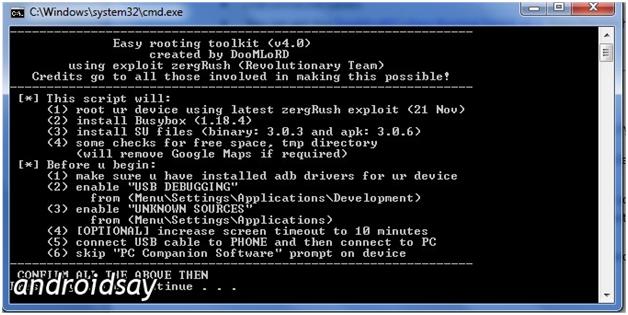
  • You will be promoted with the command promote screen window
Xperia Mini Pro
where you can see the same instructions mentioned above once again confirm those steps and press any key to start the rooting process.
  • That’s it stay back and relax your computer will take care of rooting your mobile!

And here is a list some more supported mobiles to root with this method
  1. Sony Xperia Mini Pro
  2. Sony Xperia Neo
  3. Sony Xperia X10 (GB firmware)
  4. Sony Xperia Mini S51SE
  5. Sony Xperia Pro
  6. Sony Xperia Active
  7. Sony Xperia Play [R800i/R800x]
  8. Sony Xperia Arc
  9. Sony Xperia Arc S

If you have any queries let me know by commenting.

Read More...

Monday, October 15, 2012

IM+ 6.some update brings new emoticons, improved program


IM Android APP

Popular instant message app IM+ ended up being updated to variant 6.4 last week, bringing the user interface up to date with newer types of Android and adding new features like Rage Face emoticons.

IM+ is popular with users due for you to its features plus the wide ranges involving services it may connect to. Search engines Talk, Facebook, Goal, ICQ and Mouth off are just a few of the features the application supports. The unexampled update brings a couple new services for the ever growing number: Gadu-Gadu in addition to MeinVZ.

Version 6.4 of IM+ brings some very helpful new features beyond the fun but less than useful Rage Deal with emoticons. Sleep Manner, for example, is usually a new feature that allows you to purchase a time range when you won’t end up being bothered with notices.
Users can now bulk export chat history to an SD card, and that is very useful when chat contained information that you want to make sure isn’t lost. Other the latest features include the option to further customizes announcements and the choice to automatically start “off-the-record” message.

IM+ has in addition improved its interface, claiming that the item “feels like Frozen treats Sandwich.” While the actual UI is undoubtedly better for people of Ice Treatment Sandwich and Jelly Bean, the app isn’t completely Holo-themed.
The day right after IM+ was kept up to date to version 6.4.1, another update followed, bringing the model number to vi.4.1. That is maintenance releases composed of crash and irritate fixes.

IM+ is a Free download in the actual Google Play Store and works about devices running Android 2.1 or over.  Certain features are just available in IM+ Pro which costs $4.99, yet this version besides removes ads in addition to includes extra solutions like Skype, which is an in-app purchase in the particular free version associated with IM+.

Are you a great IM+ user? Then Hope you like the features in the fresh update?
Read More...